We use cookies to improve our services our website. We and selected third parties use these to analyse our website's use by visitors, ads personalisation and content based on your interests, improve our website, and ensure our website functions correctly. You can select which cookies you want to allow, or change your consent choices at any time, please read the Cookie Policy. Learn more.


I need to remove the steam press water tank to refill it, but it is stuck?
If the correct procedure is not followed when removing and refilling the water tank, you may find that the tank cannot be removed at all. This is a common issue we are asked about. Below, we explain the correct method for removing the water tank on the ESP26 or ESP36 steam press, whether you are refilling it with water or replacing the cartridge.
Steam ironing presses are designed to be quick and easy to use, so many users begin ironing without reading the instruction manual. However, an important detail is explained in the manual that is easy to overlook: the water tank can only be removed when the press jaws are open.
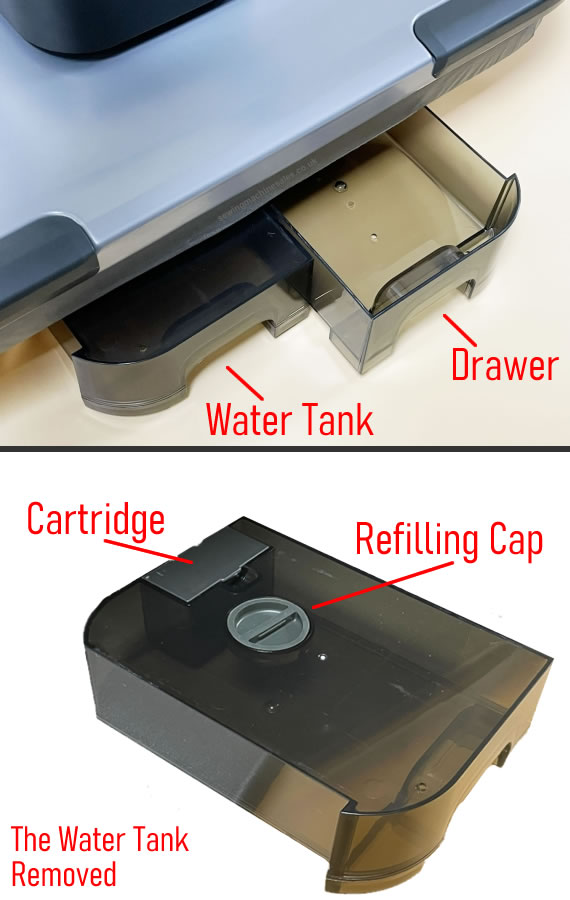
There is only one correct way to remove the water tank. Please follow these steps carefully:
-
Unplug the power lead from the steam press for safety.
-
Place the steam press on a flat, stable surface.
-
Unlock the press and fully open the jaws.
-
Opening the jaws releases the locking mechanism on the water tank, allowing it to be removed.
-
Remove the water tank and refill it using the supplied water jug. Do not overfill the tank.
-
Slide the water tank back into position until it is securely seated.
We frequently hear from customers who are unable to add water because they believe the water tank is stuck. In nearly all cases, this happens because the user is attempting to remove the tank while the press jaws are closed.
To clarify:
-
Jaws closed: The water tank is locked in place and cannot be removed. This position is intended for storage or transportation.
-
Jaws open: The water tank is unlocked and can be removed for refilling.
The same principle applies to the slide-out storage drawer located next to the water tank, it can only be removed when the press jaws are open.
These instructions apply to Singer ESP26 and ESP36 INTELLIGENT 2.0 ironing presses.